
Empire IL · Authorized Acronis reseller
Backup, recovery and cyber security for your business, in one Acronis system
Your business's servers, computers and Microsoft 365 accounts are backed up, protected against ransomware and ready to restore. All from one console, managed by us or by you.
- Authorized reseller
- AES-256 encryption
- Managed or self-managed
- Support in Hebrew
The quote is based on the number of devices, the data volume and the level of protection you choose.
What is protected
- Servers
- Computers
- Virtual machines
- Microsoft 365
- Websites
Acronis Cyber Protect Cloud
One agent · One console
- Backup
- Cyber security
- Recovery
Where it is stored
- Acronis cloud
- AES-256 encrypted
- Immutable copy
One system
Backup, security and management from the same console
Encrypted end to end
AES-256 in transit and at rest
Ransomware protection
Detection, blocking and automatic recovery
Two ways to work
Managed service or self-managed
Most requested solutions
Four solutions, one system
You can start with backup only and add layers as the business grows. Everything is managed from the same console.
One console
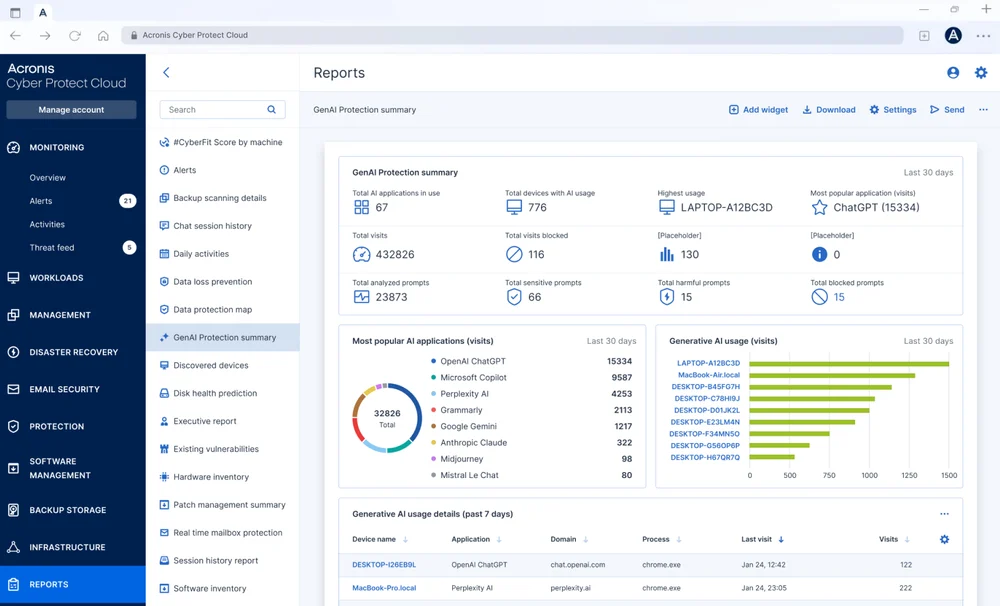
See everything on one screen
Instead of one product for backup, a second for antivirus and a third for monitoring, Acronis brings them all together in one agent and one console. Fewer licenses, fewer screens and fewer things that fall through the cracks.
You, or we on your behalf, see in real time which devices are protected, which backups succeeded and where an alert needs attention.
- The protection status of every device at a glance
- Alerts with the cause of the failure and how to resolve it
- Periodic reports for management and audits
- A list of devices that are not yet protected
Official video
Acronis Cyber Protect Cloud in brief
A short overview from Acronis of how the system combines backup, security and management.
The video is in English, from the official Acronis YouTube channel.
All services
Everything Acronis offers, through us
We provide all Acronis Cyber Protect Cloud services. Choose only what you need, and add more later without replacing the system.
Data protection
- Cloud backupServers, computers, virtual machines, databases and mobile devices.
- Disaster recovery (DRaaS)Runs the copy in the Acronis cloud when the primary environment is down.
- Microsoft 365 backupExchange Online, OneDrive, SharePoint and Teams.
- Google Workspace backupGmail, Drive, contacts and calendar.
- Email archivingLong-term retention and fast search of Microsoft 365 email.
- File sync and shareSecure file sharing between employees and devices.
Cyber security
- Ransomware and malware protectionActive Protection detects suspicious encryption, stops it and restores the files.
- EDR and XDRDetection, investigation and response to incidents on endpoints and beyond.
- MDR: managed detection and responseA team of security experts that monitors and responds to incidents for you.
- Email securityBlocks phishing, spam and malicious files before they reach the inbox.
- Data loss prevention (DLP)Controls the transfer of sensitive data through peripheral devices, the network and applications.
- Security awareness trainingShort training sessions and phishing simulations that reduce human error.
Management and operations
- Remote monitoring and management (RMM)Tracks device health and handles issues remotely.
- Patch managementInstalls security updates for the operating system and applications.
- Vulnerability scanningFinds weaknesses in systems before they are exploited.
- Remote accessA secure connection to computers and servers for support purposes.
- Hardware and software inventoryAn up-to-date list of the devices and the installed software.
- Disk health monitoringEarly warning of a disk that is about to fail.
Can't find a particular service? Write to us. If Acronis offers it, we can provide it.
How to work with us
Managed by us or managed by you
The same system and the same protection. The only difference is who operates it day to day.
We manage it for you
Suited to a business without an IT team, or to a team that prefers to focus on other things.
- Setup, agent installation and backup policy configuration
- Ongoing monitoring of the backups and handling of alerts
- Periodic restore tests
- Guidance during a real restore
You manage it yourselves
Suited to IT professionals, IT service firms and organizations with a technical team.
- Full access to the management console
- Protection plans and schedules set according to your needs
- Self-service restore at any time
- Our support when you need help
Onboarding process
From first contact to a first backup that works
A short, clear process. In the managed service, we do most of the work.
- Step 1
Scoping
We map the devices, the critical data and the retention and regulatory requirements.
- Step 2
Installation and configuration
We install the agent on the servers and computers and configure a protection plan.
- Step 3
Restore test
We verify in practice that the first backup can actually be restored.
- Step 4
Ongoing support
Monitoring, alerts and reports, and support in Hebrew when needed.
Comparison
Separate tools versus one system
Why businesses move from assembling several products to a single solution.
| Topic | Separate tools | Acronis through Empire IL |
|---|---|---|
| Backup and security | Different products and vendors | One agent and one console |
| Ransomware protection | Depends on an additional tool | Built in, with automatic recovery |
| Disaster recovery | Manual, lengthy restore | The copy runs in the cloud |
| Microsoft 365 | Usually not backed up | Backed up, including email archiving |
| Day-to-day management | Several screens and several accounts | One screen |
| Support | Dealing with several vendors | One point of contact, in Hebrew |
FAQ
Frequently asked questions about Acronis
What is Acronis Cyber Protect Cloud?
A single system that combines backup and recovery, cyber security (including ransomware protection) and central management. Instead of assembling several separate products, you install one agent on each device and manage everything from one console.
What is the relationship between Empire IL and Acronis?
Empire IL is an authorized Acronis reseller. We provide all Acronis Cyber Protect Cloud services, set them up and configure them, and provide support in Hebrew.
Where are the backups stored?
The backups are stored in the Acronis cloud, encrypted with AES-256 in transit and at rest. We choose the storage region together during the scoping stage, according to your requirements.
Can we manage the system ourselves?
Yes. You can choose a managed service, in which we set up the system, monitor it and handle alerts, or go self-managed with full access to the console and our support as needed.
How does Acronis protect against ransomware?
The Active Protection mechanism monitors suspicious process behavior, stops an encryption attempt and automatically restores the affected files. In addition, you can enable immutable storage, so that even an attacker with permissions cannot delete the backups.
Which systems can be backed up?
Servers and computers running Windows, Linux and macOS, virtual machines on VMware and Hyper-V, databases and applications such as Microsoft SQL Server and Exchange, Microsoft 365 and Google Workspace accounts, and mobile devices.
Do we have to take all the services?
No. Most customers start with backup, and add disaster recovery, Microsoft 365 backup or cyber security as needed. Everything is added to the same system, with no reinstallation.
How much does it cost?
The price is determined by the number of devices or users, the data volume and the services you choose. Send us the details using the form on this page and we will get back to you with a clear quote.
Quote
We will build a quote that fits your business
Tell us briefly what needs to be protected, and we will get back to you with a clear quote: what is included, how much it costs and how to get started.
- A quote based on your number of devices and users
- Advice on the right level of protection, with no commitment
- A reply in Hebrew from a professional