
Acronis Cyber Protect · Cyber security
Ransomware protection and EDR, from the same agent that runs your backups
Acronis detects and stops an attack, shows exactly what happened, and restores the affected files from the backup. Backup and security are in the same system, so the response to an incident is faster too.
- Active Protection
- EDR and XDR
- Email security
- Data loss prevention
The protection can be added to an existing Acronis backup with no additional installation.
Detection
A process starts encrypting files at an unusual rate, and the system detects the behavior.
Stopping
The process is stopped before the encryption spreads to the rest of the files.
Automatic recovery
The files that were already affected are returned to their previous state.
Reporting
An alert arrives with details of what happened and on which device.
One agent
Backup and security with no additional software
Ransomware protection
Blocking and automatic recovery
See the whole attack
The chain of events on one screen
Response that includes recovery
Isolation, remediation and return to the backup
Protection layers
Layered protection, according to what the business needs
Start with the basics and add layers. Everything is enabled from the same console and on the same agent.
Ransomware protection
Acronis Active Protection detects an encryption attempt by its behavior, stops it and restores the affected files.
Antivirus and malware protection
Real-time protection that combines signatures, behavioral analysis and exploit prevention.
EDR: endpoint detection and response
Shows the attack chain step by step and lets you isolate a device, stop a process and restore from backup.
XDR: beyond the endpoints
Adds events from email, identities and Microsoft 365 applications to the same picture.
MDR: managed service
A team of security experts monitors the alerts, investigates incidents and responds to them for you.
Email security
Filters phishing, spam, impersonation and malicious files before the message reaches the inbox.
Data loss prevention (DLP)
Control over sensitive data that leaves the organization through removable devices, printers, email and network applications.
Vulnerability scanning and patching
Finds out-of-date software and installs security updates, with an automatic backup before the update.
Security awareness training
Short training sessions and phishing simulations, because most attacks begin with an employee's click.
EDR
Not just blocking. Understanding what happened
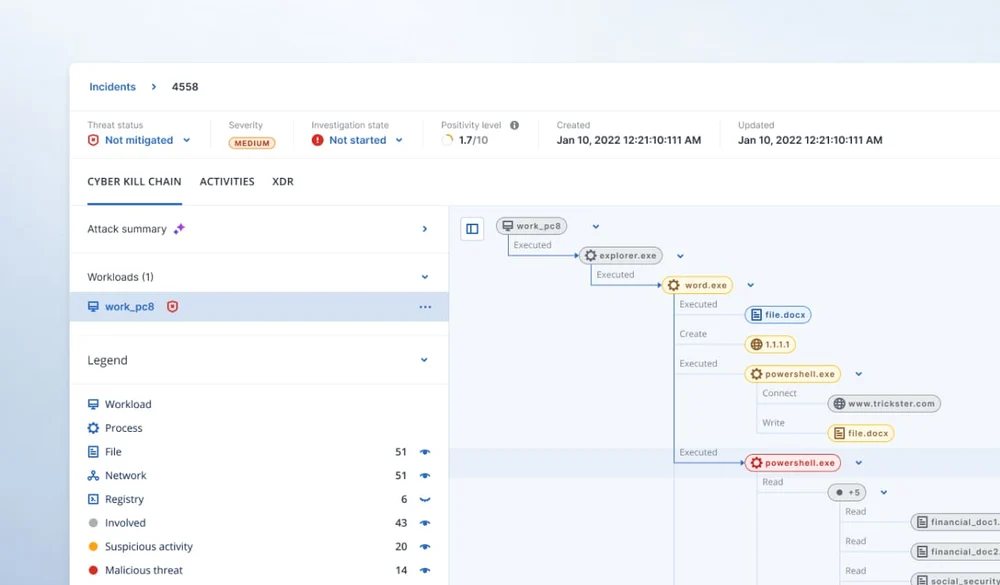
Antivirus stops what it recognizes. EDR monitors the behavior on the device, detects even an attack that has no signature, and presents it as a single story: where it came in, which processes it launched and which files it touched.
From the same screen you can isolate the device from the network, stop the process, remove the threat and return the device to a healthy state from the backup.
- The attack chain in a single view
- A description of the incident in clear language, even for people who are not security analysts
- Remote device isolation and process termination
- Restore from backup as part of the incident response
Protection plan
One policy for all devices
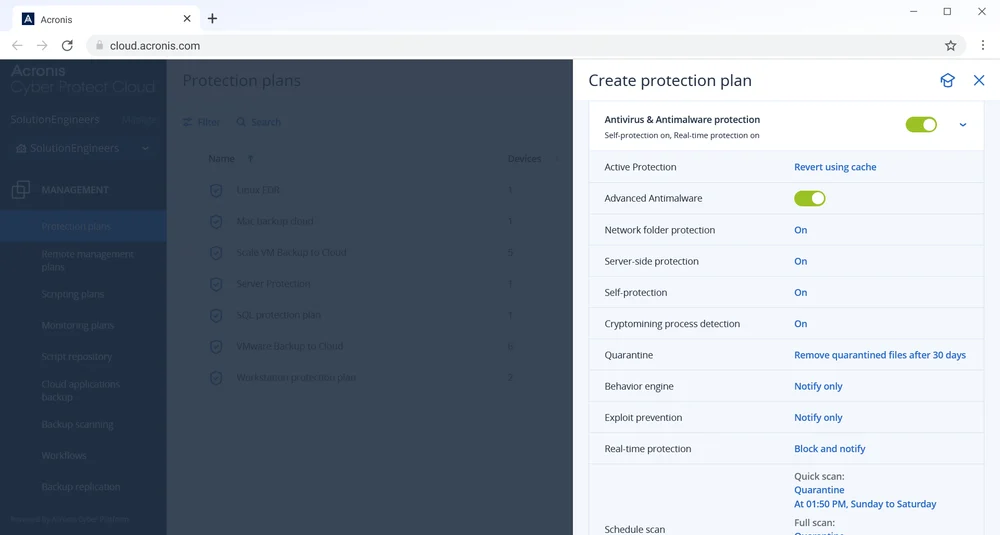
The protection is configured in the same plan in which the backup is configured: real-time protection, Active Protection, URL filtering, scheduled scans and more.
That way, no device ends up with backup but without protection, or the other way round.
- Real-time protection and self-protection for the agent
- Protection for network folders and servers
- Detection of cryptomining and suspicious processes
- Quarantine and scheduled scans
Official video
What stopping ransomware looks like
A demonstration from Acronis: Active Protection detects an encryption attempt, stops it and restores the files.
The video is in English, from the official Acronis YouTube channel.
Why together
Security that knows how to restore
In most businesses, security and backup are two products from two vendors. During an incident, one team stops the attack and another team tries to work out which backup can be restored from.
When the two are in the same system, the incident response includes the restore as well, and the backup itself is scanned so that the threat is not brought back with it.
Separate security and backup
- Two agents on every device
- Two consoles and two vendors
- Restore is a separate process from the response
- The backup may contain the malware
Acronis Cyber Protect
- One agent and one console
- Incident response that includes restore
- Scanning of the backups to find malware
- Protection for the backup files themselves
How to work with us
Who handles the alerts?
A security system is only as good as whoever is watching it.
We monitor it for you
For a business that has nobody to go through security alerts every day.
- Setup and protection policy configuration
- Monitoring of alerts and handling them
- Regular updates on unusual events
- Option to add the Acronis MDR service
Your team manages it
For an organization with a security person or an IT team.
- Full access to the console and the investigation tools
- Policy configured according to your procedures
- Integration with the organization's existing tools
- Our support when needed
FAQ
Frequently asked questions about cyber security
What is the difference between antivirus and EDR?
Antivirus blocks known threats based on signatures and patterns. EDR continuously monitors what happens on the device, also detects suspicious behavior that is not yet known, shows the attack chain and lets you respond: isolate, stop and remediate.
What is XDR and what is MDR?
XDR extends EDR and adds further sources such as email, identities and cloud applications to the same picture. MDR is a service: a team of experts that monitors the system, investigates alerts and responds to incidents for you.
How does Active Protection stop ransomware?
The mechanism monitors the behavior of the processes on the device. When a process starts changing and encrypting files in a way that is typical of ransomware, it is stopped, and the files that were already affected are restored automatically from a saved copy.
We already have antivirus. Do we need to replace it?
Not necessarily. You can run Acronis for backup and ransomware protection alongside an existing product, or you can move to full Acronis protection and consolidate everything in one agent. We will make a recommendation based on what you have installed today.
Does the protection slow down the computers?
Because backup, security and management run in the same agent, there are not several programs competing for resources. In most environments, the impact on day-to-day work is small.
Can we start with ransomware protection only?
Yes. The protection is built in layers, and you can add EDR, email security or DLP at a later stage without installing again.
Quote
We will match the protection layers to your business
Tell us how many devices you have and what is installed today, and we will get back to you with a recommendation and a quote.
- A recommendation on the layers that suit the business
- Integration with the backup, if you already have one
- No commitment