
Acronis Cyber Protect · Disaster recovery
Disaster recovery (DRaaS): the business keeps working even when the server goes down
Backup protects the data. Disaster recovery protects the work: when the primary environment is down, its copy starts in the Acronis cloud, and employees continue from there until things are back to normal.
- Failover to the cloud
- Ready-made recovery runbooks
- Tests without disrupting work
- Orderly return (Failback)
Recovery times are set together with you, according to the systems that are critical to the business.
The primary environment is down
- Application server
- Database
- File server
Recovery servers in the Acronis cloud
Started from the latest backup
- In a defined order
- Isolated network
- VPN connection
Work continues
- From the office
- From home
- Customers and suppliers
No DR site of your own
The entire infrastructure is in the Acronis cloud
Ready-made runbooks
The server start-up order is defined in advance
Real tests
Test failover in an isolated environment
From the same console
Added to the existing backup
Backup versus recovery
Backup brings back the data. DR brings back the work
After a serious failure, restoring a server from backup can take many hours: you need replacement hardware, installation and the transfer of all the data. In the meantime, orders, bookkeeping and email are at a standstill.
With disaster recovery, you do not wait for the restore. The copy of the server is started in the Acronis cloud, employees connect to it, and the primary environment is rebuilt in the background.
Backup only
- The data is safe and can be restored
- Replacement hardware is needed before you start
- The business is down until the restore is complete
- Suited to systems that can wait
Backup with disaster recovery
- The server is started in the cloud from the backup
- No dependence on hardware in the office
- Employees keep working from the cloud
- Suited to systems the business depends on
When it really happens
What happens when something goes wrong
Fire, flood, hardware failure, a ransomware attack or human error. The cause matters less than the question of how quickly you get back to work.
The process is written in advance as a runbook: which servers start, in what order and what is checked at each step. That way, nobody improvises at the most stressful moment.
Identifying the failure
The primary environment is unavailable and the decision to fail over is made.
Running the runbook
The recovery servers start in the cloud in the defined order.
Connecting the employees
They connect over a secure connection and keep working.
Rebuilding the primary environment
Whatever was damaged is repaired or replaced, without pressure.
Return to normal (Failback)
The updated data is transferred back to the primary environment.
Management and monitoring
Know at any moment whether you are ready
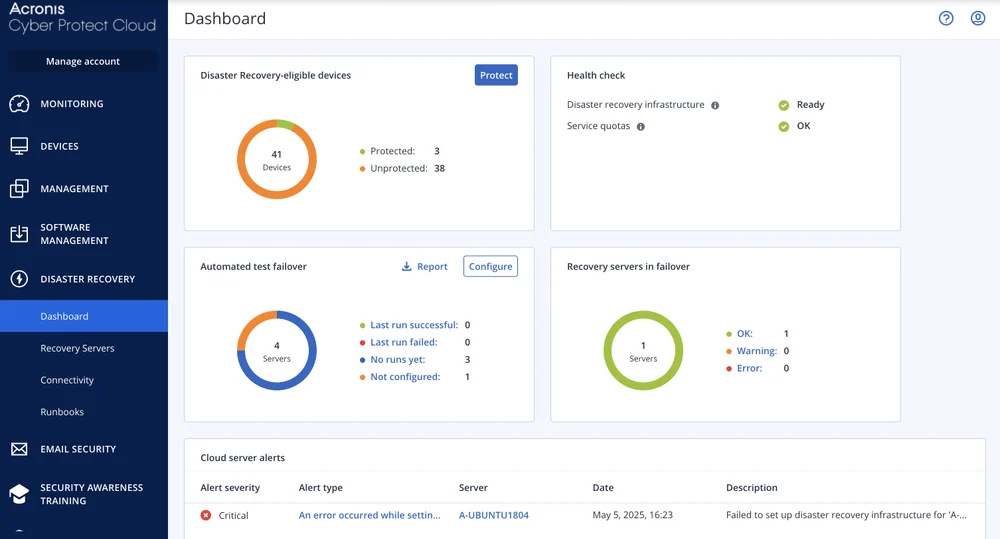
The dashboard shows which devices are protected with disaster recovery, the state of the cloud infrastructure and the results of the latest test.
A plan that has not been tested is only an assumption. That is why the system runs a test failover in an isolated environment, without touching the working environment, and reports whether the servers started as expected.
- The protection status of every server
- The health of the recovery infrastructure in the cloud
- The results of the latest test failover
- Alerts about cloud servers that need attention
Capabilities
What is included in Acronis disaster recovery
Everything needed to plan, test and run a failover to the cloud.
Recovery runbooks
Define the server start-up order and the checks at each step once, and run it with a click.
Test failover
Run the runbook in an isolated environment to verify that it works, without affecting day-to-day work.
Secure connection to the cloud
A VPN connection between the office and the cloud, and remote access for employees who connect from home.
Choice of point in time
You can start from the latest backup or from an earlier point, for example from before a ransomware attack.
Return to the primary environment
An orderly Failback process that brings the changes made in the cloud back to your servers.
Primary servers in the cloud
You can also keep a server that runs all the time in the cloud, for example a domain controller, to shorten the failover.
Official video
Acronis Disaster Recovery in brief
A short explanation from Acronis of how the service starts the servers in the cloud during a failure.
The video is in English, from the official Acronis YouTube channel.
Two terms worth knowing
RPO and RTO: the two decisions that shape the plan
Until they are made, there is no point in discussing price or technology.
RPO: how much data you can afford to lose
Recovery Point Objective. If the backup runs once a day, in the worst case you lose a day of work. The more frequent the backup, the less you lose.
RTO: how long you can afford to be down
Recovery Time Objective. The time from the moment of the failure until the system is available again. Disaster recovery exists to shorten it.
Not every system is the same
The ordering system is more urgent than an old archive. You rank the systems, and invest in fast recovery only where it is needed.
Setup process
How a recovery plan is built
Four steps, ending with a plan that has been tested in practice.
- Step 1
Mapping and ranking
We identify the critical systems and set RPO and RTO targets for each one.
- Step 2
Cloud setup
We configure the recovery servers, the network and the secure connection.
- Step 3
Writing the runbook
We define the server start-up order and the checks at each step.
- Step 4
Testing and maintenance
We run a test failover, fix what needs fixing and repeat the test periodically.
FAQ
Frequently asked questions about disaster recovery
What is DRaaS?
Disaster Recovery as a Service. Instead of building and maintaining an alternate site of your own, the copies of your servers are kept in the cloud and started there when the primary environment is down.
What is the difference between backup and disaster recovery?
Backup keeps a copy of the data, and restoring from it takes time and hardware. Disaster recovery runs the copy itself in the cloud, so work continues while the primary environment is being rebuilt. Disaster recovery relies on the backup, so it is an additional layer on top of it and not a replacement.
How long does it take to get back to work?
It depends on the number of servers, the start-up order and the runbook that was defined. We set the target together at the planning stage, and verify with a test failover that it is actually met.
Do all the servers need disaster recovery protection?
No. Usually only the systems the business cannot work without are protected this way, and the rest are covered by regular backup. That keeps the cost reasonable.
How do employees connect during a failover to the cloud?
Over a secure VPN connection. The entire office network can be connected to the cloud, or each employee can be connected separately from home.
What happens when the failure is over?
A Failback is performed: the data that changed while working in the cloud is transferred back to the primary environment, and work returns to it in a planned way.
Is it suitable for a small business too?
Yes. Because there is no need for an alternate site or duplicate hardware, even a business with one or two servers can have a real recovery plan.
Quote
We will build a recovery plan for you
Tell us which systems are critical to the business, and we will get back to you with a quote and a work plan.
- Mapping of the critical systems
- RPO and RTO targets that fit the business
- A failover test before you rely on the plan