
Acronis Cyber Protect · Microsoft 365
Microsoft 365 backup: your business's email and files, in a copy that is yours alone
Acronis backs up Exchange Online, OneDrive, SharePoint and Teams directly from cloud to cloud. Per user, with no storage limit, and including email archiving. When something is deleted, you restore a message, a file or an entire mailbox.
- No installation
- Unlimited storage
- Email archiving included
- Single-item recovery
Pricing is based on the number of users only, with no storage calculations.
Your Microsoft 365
- Exchange Online
- OneDrive
- SharePoint
- Teams
Acronis cloud
An independent copy, encrypted with AES-256
- Per user
- Unlimited storage
- Email archiving
What you restore
- A single message
- An entire mailbox
- A file or folder
- A site or team
Per user
A clear price, regardless of storage volume
No storage limit
For the backup and for the email archive
No installation
A connection to the Microsoft 365 account
AES-256 encrypted
A copy outside the Microsoft environment
Why backup is needed
Microsoft looks after the service. You look after the data
Under Microsoft's shared responsibility model, Microsoft is responsible for keeping the service available, and the customer is responsible for their own data. Deleted items are kept in the recycle bin for a limited time, and after that they are permanently deleted.
An external backup is a separate copy that does not depend on the Microsoft 365 account. Even if a user deleted something, an account was breached or a license was canceled, the data remains.
What Microsoft provides
- Service availability
- Data center security
- Replication between sites
- A recycle bin for a limited period
What Acronis backup adds
- An independent copy outside Microsoft
- Restore even after the recycle bin has been emptied
- Retention of the mailboxes of employees who have left
- Return to a point in time before an attack
What is backed up
Everything the business keeps in Microsoft 365
Automatic backup of the core services, including new users who join the organization.
Exchange Online
User mailboxes, shared mailboxes and group mailboxes: email, attachments, calendars and contacts, including the archive mailbox.
OneDrive
Every user's files and folders, with the option to restore a previous version of a file.
SharePoint Online
Team sites, document libraries and lists.
Microsoft Teams
Teams, channels, channel files and team mailboxes.
Email archiving
Long-term retention of all email, with fast search for inquiries, audits or legal requests.
Entra ID
Backup of users, groups and access settings, available as an add-on.
Management
Connect once, and the backup runs on its own
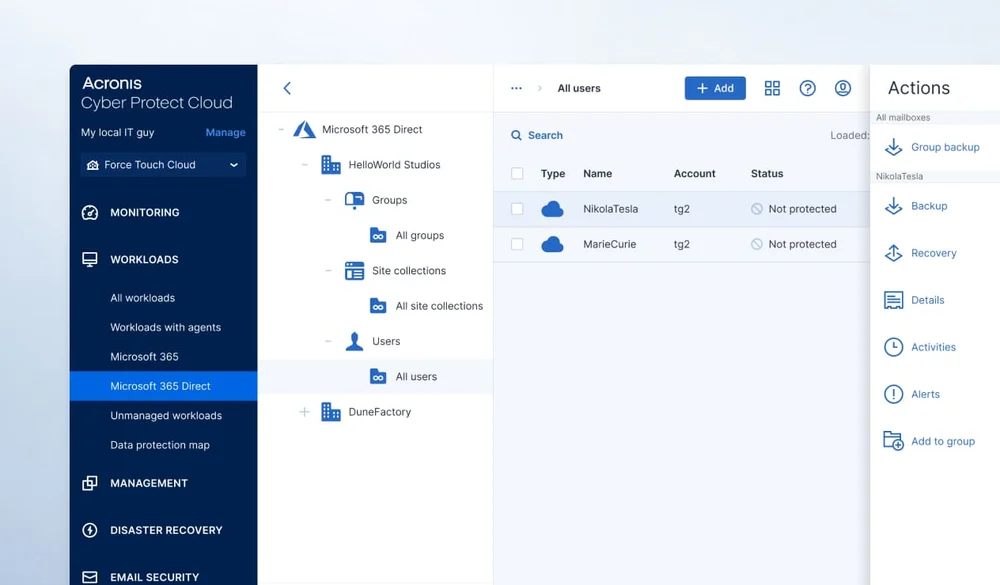
You connect the organization's Microsoft 365 account to the Acronis console, choose what to back up, and that is it. There is no agent to install and no server to maintain.
A backup plan can be applied to a whole group, so every new employee who joins the organization is backed up automatically, without anyone having to remember to add them.
- Automatic backup with no intervention
- Automatic addition of new users, sites and teams
- A clear view of who is protected and who is not
- Managed by us or self-service access to the console
Search and restore
Find the right message, and bring back only that one
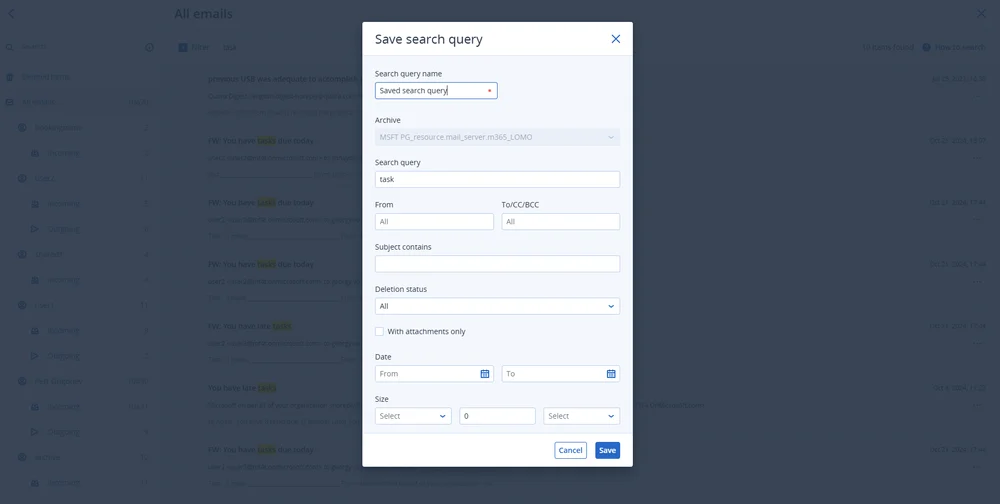
There is no need to restore an entire mailbox to find one email. You search inside the backup by sender, recipient, subject or date, and restore the message to its original location or to another user's mailbox.
The email archive, which is included in the service, keeps correspondence for the long term and lets you search even messages that were deleted from the mailbox long ago.
- Search by sender, recipient, subject and date
- Restore of a message, a folder or an entire mailbox
- Restore to the original user or to another user
- Saved searches for reuse
Official video
How to back up Microsoft 365 with Acronis
A demonstration from Acronis: backup of a mailbox, OneDrive, SharePoint and Teams.
The video is in English, from the official Acronis YouTube channel.
Scenarios
What happens without backup, and what happens with it
Five cases that happen in every business.
| The case | Microsoft 365 only | With Acronis backup |
|---|---|---|
| An employee deleted a folder, and it was noticed months later | The recycle bin has already been emptied | Restore from the relevant point in time |
| An employee left and the license was canceled | The mailbox is deleted after about 30 days | The mailbox remains in the backup and in the archive |
| Ransomware encrypted files in OneDrive | The encrypted files sync to the cloud, and restore is time-limited | Go back to the version from before the attack |
| You need an email from three years ago | Depends on whether it has been deleted in the meantime | Search the email archive |
| An account was breached and content was deleted deliberately | The attacker can empty the recycle bin too | The copy in Acronis is not affected |
FAQ
Frequently asked questions about Microsoft 365 backup
Doesn't Microsoft back up the data itself?
Microsoft replicates the data between its data centers so that the service stays available, but that is not a backup you can use to go back in time. Deleted items are kept for a limited period, usually up to 30 days in the mailbox and up to 93 days in OneDrive and SharePoint, and after that they are permanently deleted.
What exactly is backed up?
Exchange Online mailboxes (including shared mailboxes, group mailboxes and the archive mailbox), OneDrive files, SharePoint sites, and teams and channels in Teams together with their files. Entra ID backup is available as an add-on.
Are private chats in Teams backed up too?
No. The backup covers the teams, the channels and their files. Private chats (one-on-one and group) are not included in the backup, and channel conversations can be downloaded for viewing but are not restored back into Teams.
How is the price calculated?
By the number of users backed up, with no limit on storage volume and including email archiving. Send us the number of users and we will get back to you with a quote.
Do we need to install anything?
No. This is a cloud-to-cloud backup: you connect the organization's Microsoft 365 account to the service, and the backup runs directly between Microsoft and the Acronis cloud.
What is the difference between backup and email archiving?
Backup is for restoring: returning a mailbox, a folder or a file to a previous state. Archiving is for retention and retrieval: keeping all the correspondence over the years and quickly finding a specific message in it. Our service includes both.
Where is the backup stored?
In the Acronis cloud, encrypted with AES-256 and completely separate from your Microsoft 365 environment. We choose the storage region together at the setup stage.
Our licenses were not purchased from you. Can we still back up?
Yes. The backup works with any Microsoft 365 environment, regardless of where the licenses were purchased.
Quote
How many users need to be backed up?
That is all we need to know to give you a quote. We will settle the rest in a short call.
- Per-user pricing, with no storage limit
- Email archiving included
- Fast setup, with no installations